Contabo is one of Europe’s best-known providers of low-cost VPS hosting and servers. In this review, I examined its current plans, features, limitations, support and user feedback.

Quick summary
I recommend Contabo to technically experienced users, developers and businesses that want as many server resources as possible for a low price. I would not recommend it as a first choice for beginners with no Linux administration experience, because most servers are unmanaged and you are responsible for security, updates and backups.
Its greatest strength is the amount of RAM, CPU, storage and data transfer you receive for the price. Potential weaknesses include variable shared-vCPU performance, a less polished user experience and support that does not include routine administration of your software in the base server price.
What is Contabo?
Contabo is a German provider of cloud VPS plans, Storage VPS plans, virtual dedicated servers, physical dedicated servers and object storage. It is primarily aimed at users who want full administrative access, generous hardware resources and the freedom to configure their own server environment.
The company was founded in 2003 and originally operated as Giga-International. It has used the Contabo brand since 2013. Today, it runs infrastructure across several regions in Europe, the United Kingdom, the United States, Asia and Australia.
Contabo is not conventional shared hosting where you launch WordPress with one click and the provider manages the server for you. It is primarily infrastructure. You receive a VPS or server, while most configuration, security, updates and day-to-day operations remain your responsibility.
Pricing and plans
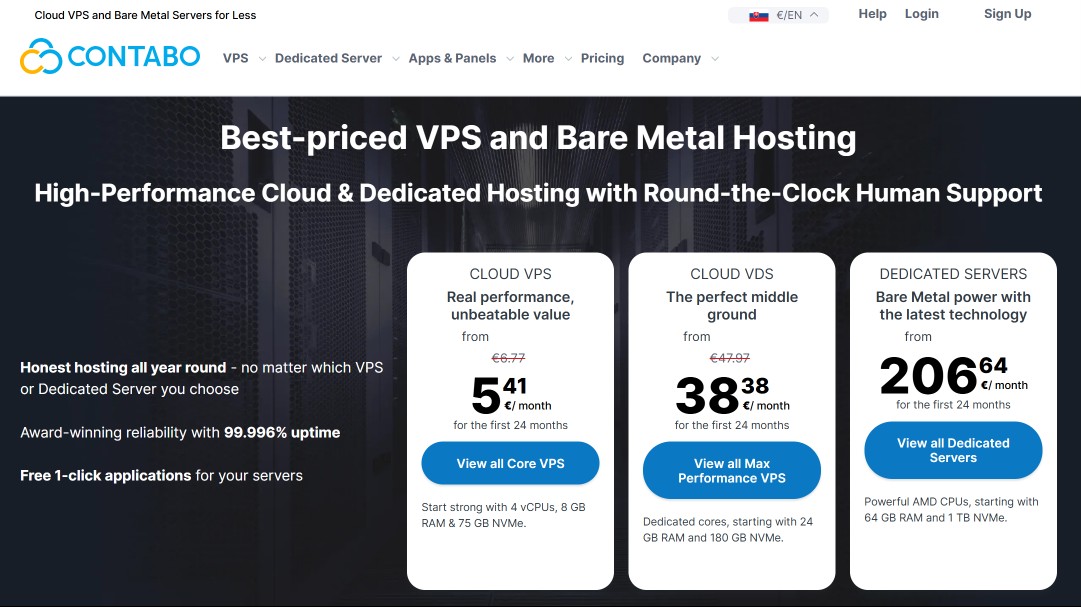
Contabo is one of the most aggressively priced VPS providers. When checked on July 21, 2026, a European Cloud VPS started at €4.50 per month, approximately $5.14 using the ECB reference rate from July 20, 2026. Your final price can vary by location, billing term, operating system, add-ons, current promotion, exchange rate and applicable tax.
Tip: You can find current coupons and promotions in our deals section.
| Plan | CPU and RAM | Storage | Data transfer | Price from |
|---|---|---|---|---|
| Cloud VPS 10 | 3 vCPU, 8 GB RAM | 75 GB NVMe or 150 GB SSD | 32 TB outbound, unlimited inbound | €4.50/mo. (about $5.14) |
| Cloud VPS 20 | 6 vCPU, 12 GB RAM | 100 GB NVMe or 200 GB SSD | 32 TB outbound, unlimited inbound | €7/mo. (about $8.00) |
| Cloud VPS 30 | 8 vCPU, 24 GB RAM | 200 GB NVMe or 400 GB SSD | 32 TB outbound, unlimited inbound | €14/mo. (about $16.00) |
| Cloud VPS 40 | 12 vCPU, 48 GB RAM | 250 GB NVMe or 500 GB SSD | 32 TB outbound, unlimited inbound | €25/mo. (about $28.57) |
| Cloud VPS 50 | 16 vCPU, 64 GB RAM | 300 GB NVMe or 600 GB SSD | 32 TB outbound, unlimited inbound | €37/mo. (about $42.28) |
Cloud VPS plans can suit web applications, several smaller websites, development environments, databases, VPNs, automation and self-hosted tools. For production workloads, however, do not choose a plan solely by its vCPU count. These are shared computing resources, so performance consistency may differ from a service with dedicated cores.
Storage VPS
Storage VPS is designed for projects where disk capacity matters more than maximum computing performance. The entry plan started at €4.50 per month, about $5.14, and included 2 vCPU, 4 GB RAM and 300 GB SSD when I checked it. This can make it useful for archives, backup storage or a file server.
A Storage VPS does not replace a robust backup strategy. When it holds important data, I recommend keeping additional copies outside that instance and, ideally, outside the infrastructure of a single provider.
Cloud VDS and dedicated servers
Cloud VDS and dedicated servers are better choices when you need more predictable performance, physical cores or complete control of the hardware. They cost substantially more than entry-level VPS plans, but may be the safer option for databases, online stores, virtualisation and steady production workloads.
Cloud VDS started at €34.40 per month, approximately $39.31, for 3 physical AMD EPYC cores, 24 GB RAM and 180 GB NVMe when checked. Dedicated server prices began higher and depended on the processor, memory, drives, port and selected location.
Pricing details to watch
The lowest listed price may not be your final checkout total. Extra charges can apply to a particular location, a Windows licence, a control panel, automatic backups, private networking, additional IP addresses or other services. Always review the entire order summary and renewal terms before paying.
Private networking for Cloud VPS instances may be billed separately. Contabo listed a charge of €2.29 per month, approximately $2.62, for every Cloud VPS connected to Private Networking when checked. You will probably not need it for a single server, but it can be useful in a multi-tier application.
Features and specifications
Contabo provides full root access, Linux and Windows, NVMe or SSD storage, snapshots, DDoS protection, a firewall, API, CLI, cloud-init, custom images and multiple regions. The feature set is strong, but much of the responsibility remains yours because the base server is not fully managed.
Performance and shared vCPUs
Contabo gives you many virtual cores and a large amount of RAM for a low price, which can be useful for parallel tasks and memory-intensive applications. Cloud VPS plans do not provide guaranteed physical cores, however, so sustained heavy workloads may vary more than they would on Cloud VDS or a dedicated server.
The price-to-performance ratio can be excellent for WordPress, development environments, smaller databases and several lightweight containers. For a business-critical store or an application with precise performance requirements, I would first run my own test and monitor CPU steal, disk latency, networking and peak-time performance.
Storage and data transfer
Depending on the Cloud VPS plan, you can choose a smaller NVMe drive or a larger SSD. I recommend NVMe for databases, online stores and applications with frequent disk operations. The SSD option makes sense when you need more space and disk speed is not your main priority.
European Cloud VPS plans included 32 TB of outbound traffic and unlimited inbound traffic when checked. Contabo reserves the right to limit speed in cases of exceptionally high or disruptive use, however, so a generous allowance does not mean completely unconditional usage.
Operating systems and custom images
Contabo supports popular Linux distributions including Ubuntu, Debian, AlmaLinux, Rocky Linux and openSUSE. Windows Server is available for an extra charge. More technical users can deploy a custom ISO or QCOW2 image and prepare their own configuration.
A custom image is useful for automated deployment, a specialist operating system or migration of an existing environment. Windows requires a licensing fee from Contabo; under its terms, you cannot simply use your own Windows licence on a VPS as a free replacement.
API, CLI and cloud-init
Contabo offers a REST API, command-line interface and cloud-init, allowing you to create and manage instances through automation. This is practical for developers, agencies and SaaS projects that do not want to perform every task manually in the dashboard and need repeatable server deployments.
The API can manage instances, credentials, SSH keys, users and tags. The CLI works on Windows, macOS and Linux and can return output as plain text, CSV, JSON or YAML.
DDoS protection and firewall
Cloud VPS includes network-level DDoS protection and the free Contabo Firewall. These provide an important first layer, not complete server security. You still need to configure the operating system, ports, user accounts, SSH, updates, applications, database and the firewall inside your system correctly.
On a new server, I recommend disabling password-based root login, using SSH keys, restricting open ports, enabling automatic security updates and setting up monitoring. For WordPress, remember to update the core, plugins and themes and to maintain separate backups.
Snapshots and automatic backups
A snapshot captures the state of a Cloud VPS and can help you return to a point before a failed update, but Contabo explicitly states that a snapshot is not a backup. Snapshots are deleted automatically after 30 days and cannot be downloaded, so do not use them as the only protection for important data.
The optional Auto Backup add-on creates daily copies and stores them separately for up to 10 days. Even with this add-on, I recommend regularly sending backups to another provider or your own storage. Cancelling a VPS permanently deletes its snapshots and associated backups.
Data centres and locations
Contabo advertises global availability across nine regions and approximately eleven to twelve locations, depending on the specific product page. For European projects, a European location is the logical choice because it reduces latency and makes it easier to keep data within the European regulatory environment.
Locations cover Europe, the United Kingdom, the eastern, central and western United States, Singapore, Japan, India and Australia. Not every product or add-on is necessarily available everywhere, and some regions may carry a higher location fee.
Advantages
Contabo’s main advantage is the amount of RAM, vCPU, storage and data transfer included for a low monthly price. It also provides full administrative access, a broad choice of operating systems and automation tools, allowing an experienced user to build a highly flexible environment on a modest budget.
- excellent RAM, CPU and storage for the price,
- generous outbound data allowance,
- choice of faster NVMe or larger SSD storage,
- full root or administrator access,
- Linux, Windows and custom images,
- API, CLI, cloud-init and automation,
- free network firewall and DDoS protection,
- multiple regions in Europe, the US, Asia and Australia,
- Cloud VPS, Storage VPS, VDS, dedicated servers and Object Storage.
Disadvantages
Contabo is not hands-off hosting for beginners. Its core servers are unmanaged, so you handle security, updates, configuration, monitoring and data recovery. Cloud VPS plans also use shared vCPUs, which means performance under load may be less consistent than on more expensive services with dedicated cores.
- most servers are unmanaged,
- not suitable for complete beginners without an administrator,
- shared CPU performance may occasionally vary according to users,
- a snapshot is not a full backup and is deleted after 30 days,
- automatic backups are an optional add-on,
- some locations and features increase the final price,
- software support and server administration are not normally included,
- the dashboard and scaling are less streamlined than modern hyperscale clouds.
My experience
For this review, I examined the current price list, order options, technical documentation, support resources and recent user ratings. I did not perform a long-term production test of a particular Contabo VPS, so it would not be fair to claim exact uptime, disk-speed or CPU-performance figures.
From a product perspective, Contabo is highly compelling. For €4.50 per month, you receive specifications that many competitors reserve for higher tiers. The generous RAM is useful for containers, self-hosted applications, development environments, databases and several smaller websites.
The biggest mistake would be to buy solely from the specification table. A vCPU count does not tell you everything about sustained performance, and an unmanaged server requires regular maintenance. If you host an important store, business application or customer data, you must plan for monitoring, security and disaster recovery.
I would therefore choose Contabo mainly for projects where budget matters and technical expertise is available. Before migrating a critical workload, I would run my own benchmark, test backup restoration and measure performance at different times over several days.
User reviews
Contabo’s user ratings are largely positive, but they are not uniform. On July 21, 2026, Contabo had a Trustpilot score of 4.5 out of 5 from more than 10,000 reviews. Five-star ratings represented 76% and one-star ratings 12%, showing that there was also a meaningful group of dissatisfied customers.
Positive reviews often praise the price, the amount of resources, stability in ordinary use and the quick resolution of some requests. Developers appreciate receiving enough RAM and storage for applications, testing or several independent services on a limited budget.
Negative experiences most often concern occasional VPS slowdowns, disk performance, outages, billing and inconsistent support speed. Some users also criticise the less modern interface or more cumbersome scaling compared with platforms designed for instantly creating and moving cloud resources.
Trustpilot is not a technical benchmark, and individual reviews should not automatically be treated as proof of overall quality. With a VPS, it is more sensible to combine public feedback with your own test of the exact location, plan and workload.
Contabo alternatives
The best alternative depends on what you dislike about Contabo. Hetzner is a strong direct competitor in European cloud infrastructure, Hostinger offers a simpler introduction to VPS hosting, Cloudways adds a managed layer for WordPress and SiteGround is more convenient for users who want managed website hosting instead of maintaining an operating system.
Hetzner
Hetzner is the most direct alternative for technical users who want European cloud services, VPS hosting and dedicated servers. It generally offers a more modern cloud dashboard and more flexible instance management, while Contabo often wins on the amount of RAM and storage in a low-cost plan.
I would prefer Hetzner for infrastructure where rapid server creation, automation and clearer cloud management are important. Contabo makes more sense for a budget-sensitive project that needs plenty of memory or disk capacity and does not require frequent infrastructure changes.
Read my detailed Hetzner review.
Hostinger VPS
Hostinger is more suitable for users who want a simpler dashboard, tutorials and an experience closer to conventional hosting. Contabo is more technical and may provide more raw resources at a similar budget, while Hostinger usually feels more approachable to a less experienced administrator.
I would choose Hostinger for a first VPS, a smaller WordPress project or a user who wants a less complicated start. I would select Contabo when you know how to secure and optimise a server and your priority is maximum RAM, disk space or data transfer for a low price.
See the details in my Hostinger review.
Cloudways
Cloudways is a much more expensive but more managed alternative for WordPress, WooCommerce and agencies. Instead of directly administering a bare VPS, you receive an optimised dashboard, application deployment, backups and tools that reduce the amount of server work on your side.
I recommend Cloudways when your website earns money and administrator time costs more than the hosting-price difference. Contabo is more suitable for an experienced administrator who wants full control and low infrastructure costs. For a critical WordPress site, Cloudways’ managed layer may be more practical.
Read my Cloudways review as well.
SiteGround
SiteGround is a more convenient alternative for businesses that want managed website hosting, an accessible dashboard and support focused on common web applications. Contabo offers more server freedom and raw resources, while SiteGround is easier for an ordinary WordPress or business website without a dedicated administrator.
I would choose SiteGround when you do not want to manage an operating system, firewall and server services. Contabo makes more sense for custom applications, containers, databases or several projects on one VPS when you have sufficient technical experience.
Learn more in my SiteGround review.
Support and contact
Contabo provides support through its customer panel, tickets and chat. Chat is available only after login, works in English and initially connects you with a virtual assistant. More complex technical problems are handled by ticket, and the base VPS price does not include complete management of your operating system and applications.
For common issues, Contabo provides a substantial help centre, guides, a status page and forms for an unreachable server. Through the panel, you can restart or reinstall a server, change Linux credentials and access the machine through VNC.
Contabo does not offer fully managed servers in the conventional sense. The optional Managed Server add-on includes two hours of technical assistance per month for one server. For the long-term operation of a production project, I therefore recommend having your own administrator or external server-management service.
You can cancel the service through the customer panel. Download all data first, because terminating a VPS permanently removes its snapshots and backups. Private customers may have a 14-day withdrawal right under specified conditions, although domains and certain services may follow different rules.
Summary and rating
Contabo is a very good option for technical users who want maximum RAM, storage and data transfer for a low price. It is not hands-off managed hosting. Its value depends on whether you can secure, monitor and back up the server properly and test its real-world performance.
My rating: 8.1/10.
I recommend Contabo if:
- you have Linux administration experience or your own administrator,
- you need plenty of RAM, CPU and storage for a low price,
- you run development environments, containers or self-hosted applications,
- you want full root access and your own configuration,
- you can set up monitoring and separate backups.
I do not recommend Contabo if:
- you want simple shared WordPress hosting,
- you cannot administer and secure a server,
- you need support in a language other than English,
- you expect a fully managed service in the base price,
- you need guaranteed and completely predictable CPU performance.
For beginners, I would choose Hostinger or SiteGround instead. Experienced users comparing raw specifications and price should put Contabo on their shortlist alongside Hetzner and run their own test before moving a production workload.
Frequently asked questions
Below are concise answers to common questions about Contabo. I focus on WordPress suitability, the service type, pricing, backups, support, performance and comparison with Hetzner because these factors usually determine whether a low-cost VPS is genuinely worthwhile for your project.
Is Contabo good for WordPress?
Yes, Contabo can be good for WordPress when you know how to administer a VPS or have an administrator. You receive plenty of RAM and storage for a low price, but you must correctly configure and maintain WordPress, the web server, PHP, database, security, updates, caching, email and backups.
Is Contabo managed hosting?
No. Contabo’s standard VPS plans and servers are unmanaged. The provider operates the infrastructure, but you are responsible for the operating system and applications. A paid Managed Server add-on includes two hours of technical assistance per month, but it is not a completely hands-off managed service.
How much does a Contabo VPS cost?
On July 21, 2026, the European Cloud VPS 10 started at €4.50 per month, approximately $5.14, for 3 vCPU, 8 GB RAM and 75 GB NVMe or 150 GB SSD. The final amount depends on location, add-ons, operating system, billing term, promotion, exchange rate and applicable tax.
Does Contabo include automatic backups?
Automatic backups are not universally included in the base VPS price. The optional Auto Backup add-on creates daily backups and retains them on separate storage for up to 10 days. Snapshots are a separate feature, are deleted after 30 days and are not considered full backups by Contabo.
Is Contabo better than Hetzner?
Contabo often provides more RAM, storage and data transfer for a low price. Hetzner commonly offers a more modern cloud environment, simpler instance creation and more flexible infrastructure. Contabo may win for a relatively static budget server, while I would consider Hetzner for a more dynamic cloud project.
What language is Contabo support available in?
Contabo’s chat is available in English according to its documentation, and more complex requests are handled by ticket. Customers who need extensive local-language assistance or help with routine website tasks may be better served by a managed host operating directly in their market.
Who is the cheapest Contabo VPS suitable for?
The entry Cloud VPS 10 can suit development, test environments, VPNs, smaller applications, several low-traffic sites and self-hosted services. I would not use it for a critical online store or demanding database without performance measurements, separate backups, monitoring and a tested recovery plan.